
Blog
PrestaShop Category Page Optimization: The Complete 2026 Guide
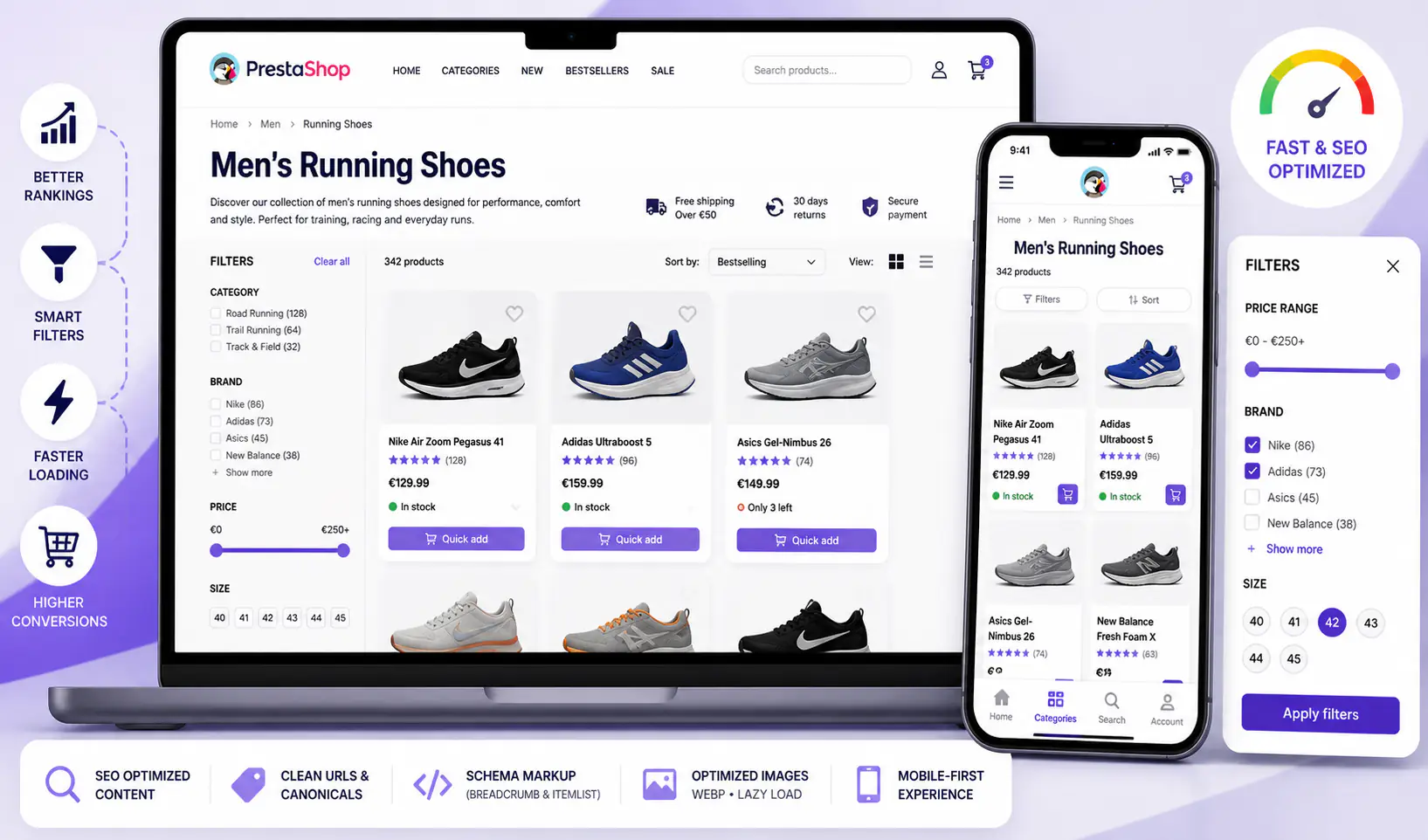
The category page is the most commercially valuable template in any PrestaShop store. It has to rank in organic search, help customers find what they need, convert browsers into buyers, and stay fast on mobile. Default PrestaShop category pages do none of these things well out of the box.
This guide covers what actually makes a high-converting, SEO-visible category page in 2026, the 10 optimizations with the largest impact, and how to measure whether your changes are working.
Why the category page is different from every other template
Product pages convert one product. Homepage handles brand. Checkout handles transactions. The category page is the only template that does three jobs at once:
- SEO landing page — ranks for high-intent queries like “mens running shoes” or “office chairs black”
- Browsing tool — lets customers filter, sort, and compare within a product range
- Conversion funnel entry — must load fast, show enough detail to pick a product, then drive clicks to product pages
When you optimize it, you have to respect all three. Make it heavier for SEO and you slow down mobile UX. Simplify filters for speed and you lose the shoppers who want facets. There’s no universal perfect category page — only tradeoffs you choose consciously.
The three jobs, in order of ROI
Job 1 — rank organically
Category pages often account for 40-60% of total organic traffic on a well-optimized store. Baymard Institute’s research shows shoppers increasingly start at category landing pages rather than homepage, especially from search. If your category pages don’t rank, you’re paying for traffic (ads) that should arrive organically.
Job 2 — convert browsers
Category page visitors are high-intent but low-commitment. They know what they want but haven’t picked a specific SKU. Your job is to narrow the field fast. Filters, clear photos, visible price, stock availability, and minimal friction to the product page.
Job 3 — load fast on mobile
Mobile now drives 70-78% of PrestaShop store traffic. Core Web Vitals impact rankings directly, and slow category pages show up as high bounce rate in analytics. A 3-second+ LCP on category pages quietly costs conversions and rankings.
Core SEO factors — what Google looks at
1. Unique H1 per category
Every category needs a distinct, keyword-optimized H1. “Products” is useless. “Mens Running Shoes” is good. “Mens Running Shoes — Free Shipping Over €50” is better (but don’t stuff unrelated keywords). PrestaShop’s default category template uses the category name as H1, so name your categories thoughtfully.
2. SEO-rich category description (intro + outro)
PrestaShop lets you add category descriptions. Most stores leave them empty. That’s 150-300 words of unique content Google values, on every category page. Split into:
- Intro text above the product grid (80-120 words) — keyword-rich summary
- Long-form content below the grid (200-400 words) — FAQ, buying guide, or detailed context
Both are indexed. The split placement serves both SEO and UX (users skip the wall of text but Google reads it).
3. Canonical strategy for filtered/sorted URLs
PrestaShop generates URLs like /category/page-2?order=price_asc&q=Brand-Nike. Without canonical management, Google sees thousands of near-duplicate pages. Best practice:
- Main category URL = canonical
- Sort and filter variants =
canonicalpointing back to main URL - Use Yoast SEO’s crawl settings or PrestaShop SEO & URLs to enforce
4. Pagination strategy
Paginated pages (/category/page-2) need their own rank logic. Options:
- Traditional pagination with
<a rel="prev/next">(deprecated by Google but some tools still use) - Infinite scroll with URL updates via History API (SEO-friendly if implemented right — covered in Pagination vs Infinite Scroll in PrestaShop)
- Load-more button with URL params (see Load More vs Auto-Load)
5. Schema.org markup — ItemList / BreadcrumbList
Category pages should emit BreadcrumbList (Home → Parent Category → Current) and optionally ItemList of featured products. Google uses both for rich snippets and understanding page structure. Yoast handles BreadcrumbList automatically in recent versions.
6. Image alt text on product thumbnails
Every product thumbnail in the grid should have a descriptive alt attribute. Google Image Search drives meaningful traffic to category pages, especially in fashion, home decor, and B2C. Default PrestaShop often leaves alt empty or generic.
Core UX factors — what customers need
7. Filters that actually filter (fast)
Faceted navigation is table stakes on category pages with 20+ products. Common filters: price range, size, color, brand, availability, rating. The critical UX rule: filters must feel instant. If they require page reloads, adoption drops 60-80%. Use AJAX-based faceted search (PrestaShop has it; enable and configure).
8. Sort options that match shopper intent
Default, price low-to-high, price high-to-low, newest, bestselling, rating. Don’t offer more than 6 sort options — decision fatigue is real. Match sort defaults to category behavior: gifting categories → “bestselling”, clearance → “price low to high”.
9. Product density and grid density
More products visible = more chances to click. But too many = overwhelming and slow. Sweet spot for most stores: 24-36 products per initial load, then pagination or infinite scroll. On mobile: 2 columns usually beats 3 columns for readability (product cards need breathing room).
10. Quick-add and visible stock
“Add to cart” directly from the category grid (without forcing product page visit) works for simple products. For products with variants (size, color), a quick-view modal helps. Show stock availability inline (“Only 3 left” or “In stock”) — urgency + trust signal combined.
10 specific optimizations, by ROI
Fix 1 — Fill in category descriptions (intro + outro)
Expected lift: 20-40% more organic traffic to that category over 3-6 months. Flat categories without descriptions rarely rank for anything beyond brand name. Write 300-600 words per category; use PrestaShop’s built-in rich text editor.
Fix 2 — Enable AJAX faceted search
Expected lift: 15-25% filter adoption increase = deeper engagement, better product discovery. PrestaShop’s core faceted search module (“ps_facetedsearch”) supports AJAX — enable it and test on mobile.
Fix 3 — Choose a pagination strategy and implement cleanly
For SEO-first stores: load-more button with URL params. For UX-first stores with strong mobile focus: AJAX infinite scroll with History API updates. For maximum compatibility: hybrid (load-more default, infinite-scroll as toggle). See Pagination vs Infinite Scroll for the decision tree.
Fix 4 — Optimize product thumbnails for Core Web Vitals
Expected lift: 0.5-2s LCP improvement on category pages. Use WebP format (or AVIF where supported), proper srcset, lazy-load below-fold images. PrestaShop generates multiple thumbnail sizes — configure responsive images properly.
Fix 5 — Add schema.org BreadcrumbList and ItemList
Yoast SEO Premium handles BreadcrumbList automatically. ItemList requires custom implementation or a module, but pays off in rich snippets for category pages with aggregate ratings.
Fix 6 — Fix canonical on filtered/sorted URLs
Expected lift: recovers crawl budget currently wasted on near-duplicate pages. Audit via Google Search Console’s Coverage report — look for “Duplicate, Google chose different canonical” warnings.
Fix 7 — Implement proper alt text on all product images
Expected lift: 5-15% additional traffic from Google Images over time. Set up a pattern: “[Product name] – [Category] – [Brand]” works for most cases. PrestaShop’s back office lets you bulk-edit alt text.
Fix 8 — Reduce cognitive load above the fold
Cut filter panels from 15 options to 6. Remove duplicate breadcrumbs. Eliminate promotional banners that push products below the fold on mobile. Your category page exists to help people pick a product, not to market them everything at once.
Fix 9 — Add inline “Quick add to cart” where feasible
Works for simple products (no size/color variants). Combine with a slide-in cart like Sliding Cart Block so the add doesn’t break browsing flow. See also PrestaShop cart abandonment guide.
Fix 10 — Implement a “recently viewed” rail at the bottom
Expected lift: 3-8% more pages per session. Shows products customers considered but didn’t click. Small UX addition, easy in most PrestaShop themes or via a simple module.
Measurement — how to know if it’s working
Organic traffic to category pages specifically
Google Search Console → Performance → filter by pages containing /category/ (or your PrestaShop URL pattern). Track clicks, impressions, average position. Compare month-over-month after each fix.
Per-category Click-Through Rate
A category with high impressions but low CTR (<2%) has title/description problems. Fix the category name, H1, meta description before doing anything else.
Cart additions from category vs product page
Google Analytics 4 — events add_to_cart with item_list_name parameter. If category-page additions are <10% of total, your quick-add functionality is missing or not working on mobile.
Filter engagement rate
% of category page sessions that use at least one filter. Below 20% means filters aren’t visible or usable enough. Above 60% means filters are working well.
Core Web Vitals per category page
PageSpeed Insights and Search Console’s CWV report. Track LCP, INP, CLS per template. Category pages often have worse CWV than product pages due to multiple images loading at once.
Tools and modules
- Faceted search: PrestaShop’s built-in
ps_facetedsearchmodule - Infinite scroll / load more: Infinite Scroll Module (our module; SEO-friendly implementation with URL updates)
- Image optimization: Webp Express (WordPress context — PrestaShop equivalents:
ps_imageslidertweaks or third-party) - Schema markup: Yoast SEO Premium or Rank Math for WordPress-based stores; PrestaShop has multiple structured data modules
- Analytics: Google Analytics 4 with enhanced ecommerce; Google Search Console for organic performance
Frequently asked questions
How many products should a category page show per page?
24-36 on desktop, 12-20 on mobile are the current good defaults. Fewer than 12 feels sparse; more than 48 slows the page significantly. Test what works for your specific product density and page weight.
Is infinite scroll bad for category page SEO?
Not inherently. Poorly implemented infinite scroll (no URL updates, no crawlable fallback) is bad. Properly implemented (History API, rel="next" fallback, or load-more button with URL params) is as SEO-friendly as pagination. Full analysis in Pagination vs Infinite Scroll.
Should category descriptions be above or below the product grid?
Both. Short intro (80-120 words) above for immediate keyword relevance and SEO signal. Longer content (200-400 words) below for additional depth without blocking the grid. Tools like Yoast SEO support this natively.
What’s the ideal category page LCP target?
Under 2.5 seconds on mobile 4G. Most default PrestaShop installations without optimization run 3.5-5 seconds. The biggest wins come from image optimization (WebP/AVIF, proper sizing, lazy loading below the fold).
Do I need separate mobile and desktop category templates?
No. Responsive templates with mobile-first CSS are the standard since 2020. Separate mobile templates hurt SEO (content duplication) and create maintenance overhead.
Where to start
Pick your three highest-traffic categories from Google Analytics and fix those first. Every other category can wait. On those three categories, do Fix 1 (descriptions), Fix 2 (AJAX filters), and Fix 4 (image optimization) in sequence, measuring for 2 weeks each.
If you’re still running default PrestaShop pagination, evaluating a move to an SEO-friendly infinite scroll or load-more pattern often recovers mobile conversion and bounce rate simultaneously.