AJAX Shopping Cart Module for PrestaShop – Sliding Cart Block
€24.99Lets customers update their cart without being kicked to another page.

PrestaShop module fixes
PrestaShop 8 or 9, a switch to the Hummingbird theme, or a module whose author no longer answers. We find the cause in the code, fix it on a copy of your store and move it live only after you’ve tested it.
Describe your problem mail_outline How it works ↓
Fixed quote before any work starts · English or Polish
# after upgrading to PrestaShop 9
PHP Fatal error: Call to undefined method Tools::displayPrice()
✓ fixed: $locale->formatPrice($price, $currencyIso)
# module configuration page, PrestaShop 8.1+
Warning: Undefined array key “is_default”
✓ fixed: language list completed for HelperForm
# Hummingbird theme, add to cart
Blockcart modal element not found in provided HTML
✓ fixed: module renders its own modal
Not sure yet what will break? Run our free PrestaShop 9 compatibility checker on your modules first. It takes a minute and you can send us the report.
Planning the upgrade yourself? Start with our 12-step PrestaShop 1.7 to 9 upgrade checklist.
We read the error, find the cause in the module’s code and fix it for your PrestaShop and PHP version.
Before you upgrade, we go through your modules and give you a list: what works, what needs a patch, what is better replaced.
Modules written for Classic often look or behave differently on Hummingbird, the default theme of PrestaShop 9. We adjust templates, CSS and JavaScript.
We patch a module its author no longer maintains, as long as its licence allows changes. We check that first.
One focused module instead of edits in theme or core files, so your changes survive the next update.
For module developers: preparing a module for the PrestaShop Addons validator and compliance review.
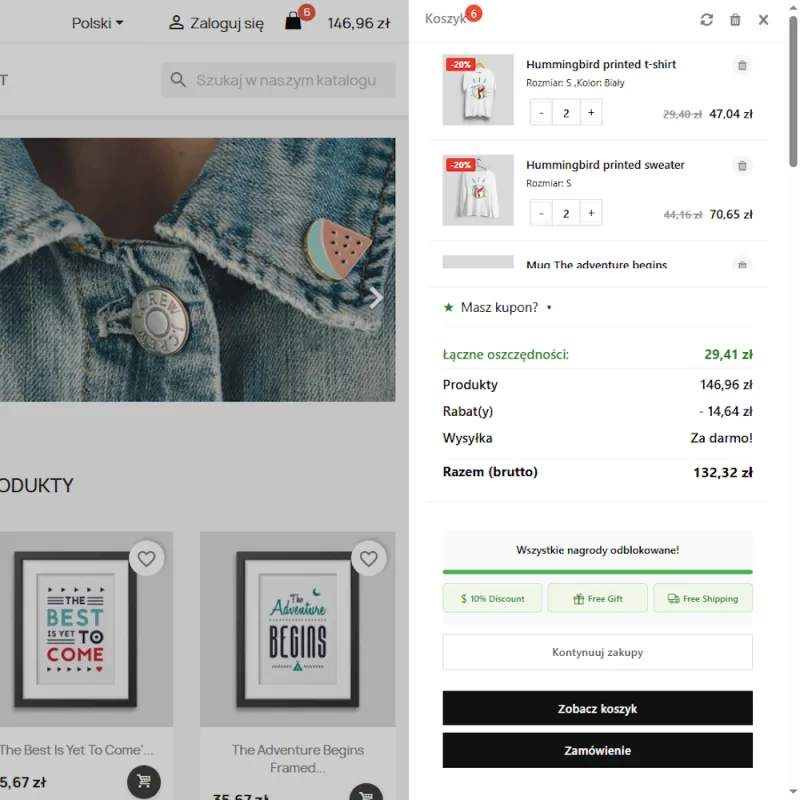
Block Sliding Cart has been on PrestaShop Addons since 2013. In 2026 we brought it to PrestaShop 1.7, 8 and 9 in one codebase and took it through the Addons validation again. Some of what that took:
Asymetria is a small web studio from Poland. We have built websites and online stores since 2007 and published our own PrestaShop modules on PrestaShop Addons since 2011. More about Asymetria.
Some will, many need changes. Typical causes: methods removed from the core (for example Tools::displayPrice()), presenter classes moved to new namespaces, stricter admin templates, and front-office code that assumes the Classic theme. A readiness check tells you which modules are affected before you upgrade.
Not at first. We work on a copy — a staging store or a local copy — and move the fix to your live shop only after you have tested it.
Yes, if its licence allows modifications. Many PrestaShop modules use the AFL or OSL licence, which does. If a licence does not allow it, we tell you before any work starts and suggest a replacement.
It depends on the module and the problem. Once we have seen it, you get a fixed quote, so there are no surprises on the invoice.
Your PrestaShop and PHP version (Advanced Parameters → Information), the module name and version or its ZIP file, the exact error message or a screenshot, and access to a staging store or a recent backup. If you ran our free compatibility checker, include its report as well.
English and Polish.
A few sentences are enough: your PrestaShop version, the module, and what happens. We reply with questions or a quote.
or write directly to info@asymetria.com.pl